Challenge the Computer
Three difficulty levels. One fair set of rules.
Play checkers online for free. Challenge the computer, plan your next move, and enjoy a classic game of strategy.
Loading game…
Three difficulty levels. One fair set of rules.
Every move is a new decision. Take your time.
Tap, play and continue in the same browser.
Select a piece and then its destination. Dragging is not required.
The setup. Both sides begin with 12 ordinary pieces on the dark squares of their nearest three rows. Only dark squares are used.
Ordinary pieces. Move one square diagonally forward into an empty square. Ordinary pieces capture forward only.
Captures are optional. You may make an ordinary legal move even when a capture is available. Rings mark every capturing piece, and × marks all capturable opponents, including those reached by later jumps. Select a piece to see every capture route and its numbered landings. Taking the most pieces is not required.
Multiple jumps. After each jump, you can keep jumping or choose End turn to stop. Click another movable piece to cancel the unfinished capture, restore its captured pieces, and choose a different move. You cannot keep the captures and move a second piece in the same turn.
Becoming a king. Reach the farthest row to be crowned. Your turn ends there, including when you arrive by jumping. The new king cannot immediately continue backward.
Kings. Move one square diagonally forward or backward. Capture an adjacent opponent by landing immediately beyond it. Kings cannot slide across several empty squares.
Winning and drawing. Having no legal move is a loss, even when pieces remain. This page automatically declares a draw after the same position occurs three times with the same side to move, or after 40 turns per side without a capture or an ordinary-piece move.
This casual 8×8 variant uses optional captures with forward-only ordinary pieces and short kings.
Easy offers a gentler opponent for learning the controls and spotting basic captures.
Medium is the default for balanced practice, including exchanges, multiple jumps and promotion threats.
Hard searches further to create a stronger challenge. It uses the same rules and has no hidden information.
Changing difficulty starts a new game after confirmation. There is no countdown, so you can take time to plan your reply.
Hint suggests a legal move without playing it for you. For a multiple capture, it shows the route. A suggestion is not a guaranteed winning solution.
Undo returns to the position before your previous completed turn and removes the computer’s reply. During a capture sequence, Undo cancels that sequence; it is unavailable after the game ends.
Your game and preferences are saved in this browser when storage is available. Changing language preserves your position and rules. Audio settings let you control music and sound effects separately.
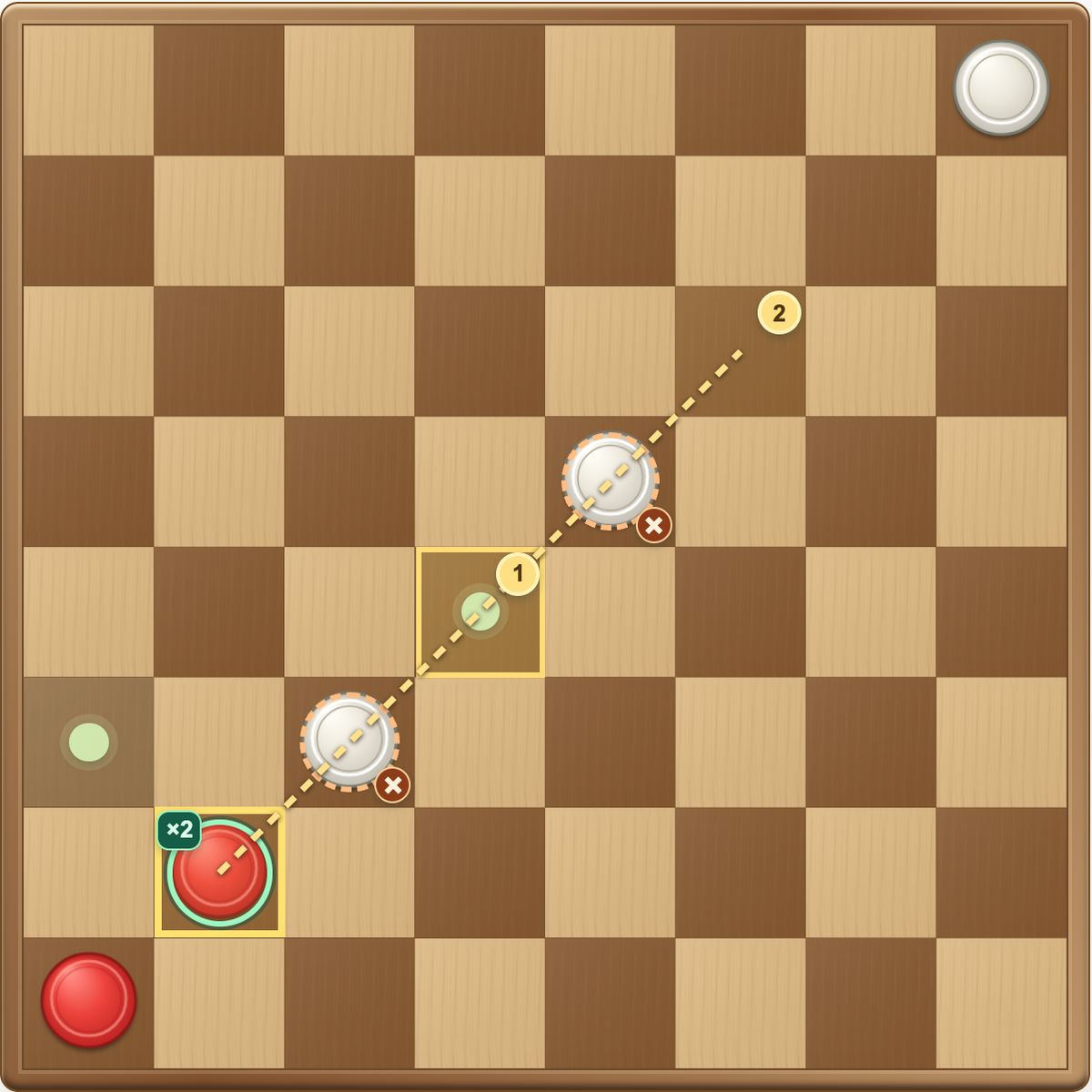
A tempting jump is easy to spot. The reply after it is where the game gets interesting. Use these habits to keep your pieces working together and give your next move a purpose.
Read the illustrated guide →No. Captures are optional. After a jump, you may continue or end the turn. Selecting another movable piece cancels the unfinished capture so you can choose a different move.
No. Ordinary pieces move and capture forward only. Kings can move and capture in both diagonal directions.
No. Captures are optional. After a jump, you may continue or end the turn. Selecting another movable piece cancels the unfinished capture so you can choose a different move.
No. Reaching the king row ends the turn. Backward movement becomes available on a later turn.
Yes. The computer loses when it has no legal move, even if some of its pieces remain.
This page declares a draw at threefold repetition with the same side to move, or after 40 turns for each side without a capture or an ordinary-piece move.
Yes. Both are included without an account or payment. They are available before starting a capture sequence. Undo can also cancel an unfinished capture.
Yes. Tap a piece and its destination. Progress stays in the same browser when local storage is available. Clearing site data may remove it, and there is no cross-device sync.