Letter Physics Puzzle Guide: Choose a Shape, Then Adjust the Spacing
Back to the game →Choose letters for what their shapes can do, not for the words they spell. A narrow stem can pass through a gap that stops a round body; a space can move two letters onto different platforms. The useful skill is predicting the first collision, observing the result, then changing one thing. These examples are specific to OnlinePuzzle’s levels.
Read the route backward from a target
Look at the final surface or opening before the glowing target. Does a piece need to roll, fit through a slot, catch a peg or span two supports? Then trace upward to the drop area. A clever letter at the wrong horizontal position is still the wrong attempt.
An o offers a rounded outline, l a thin stem, c an open curve, and m a wide base. These are useful starting hypotheses, not guarantees for every level. The dots of i and j are separate bodies. In Level 9, the authored i solution activates the target with its detached dot, not its stem.
Compare a failure with a useful shape
In Level 7, Roll or Fall, two upper platforms leave a narrow opening above the target. Try to explain the opening before choosing a letter. A round o is too broad for the route and comes to rest without touching the target. A slim l falls through and succeeds in this level’s simulation.
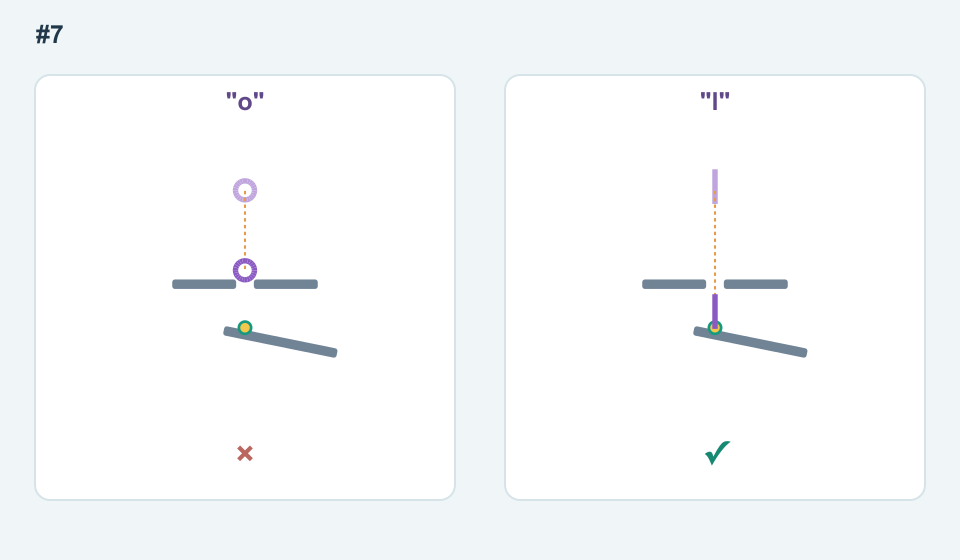
The lesson is not “always choose l.” It is to match the object’s outline to the bottleneck. Level 1 instead favors a rolling o on a slope. If a letter catches on an edge, first ask whether width or rotation caused the problem before adding more letters.
Spaces change the launch positions
From Level 3, spaces use input slots but create no physical bodies. The complete string is centered around the level’s input anchor. Adding an internal space separates letters on both sides; it does not simply push the right-hand letter while leaving the left one fixed.
Level 12, Mind the Space, makes this visible. The input oo launches two letters near the middle, away from the two separated supports. The input o o, with exactly three spaces, starts one o above each support. It touches both targets; oo fails this comparison.
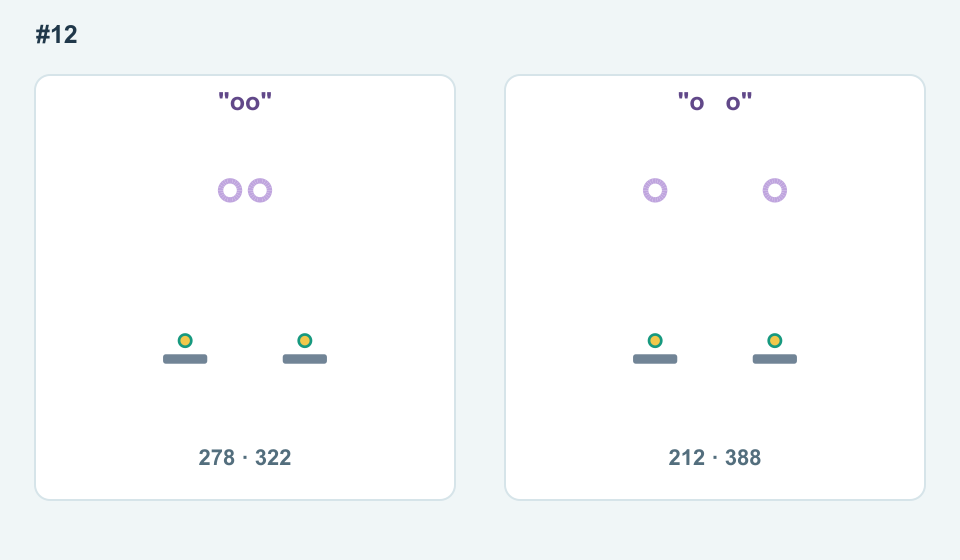
The first string uses two slots and the second five. Each still creates just two letters. In the level’s 600-unit coordinate system their starting centers change from 278 and 322 to 212 and 388. These coordinates explain the diagram; you do not need to enter coordinates while playing.
Make retries answer a question
- Choose one candidate and predict its first contact.
- Drop it and watch the first point where reality differs from your prediction.
- Keep the same shape while testing spacing, or keep the spacing while testing shape.
- Once the route works, consider a second letter only if it has a clear job: pushing, bridging or reaching another target.
Letters drop together, so more characters can block each other as easily as help. Targets stay lit once touched; there is no need to hit all of them simultaneously. On a multi-target level, keep track of which route remains unfinished instead of discarding a useful partial idea.
Use feedback without fighting the controls
Levels 1–2 accept one letter; later inputs allow up to eight slots including spaces. Input locks during a drop. Edit Letters or Restart returns to editing; Undo input does not rewind physics. If all objects leave the scene or remain still long enough, try again. Continuing motion does not lose to a countdown; an optional stop becomes available after a long period without a new target.
Hints progress from a structural clue to a letter suggestion and then a tested input. Use the first clue to refine your own experiment. There are no stars or lives to protect, and a successful hint input is not necessarily the only solution. For example, the Double Drop level accepts both o and oo in the current simulation.
Questions that come up while playing
Do I need to type a real word?
No. Any supported lowercase letters can be used, including repeats. The game checks physical target contacts, not vocabulary.
Does a space count as a letter?
It counts toward the eight input slots on later levels, but it creates no body and does not increase the number of physical letters.
Why does i split?
Its dot and stem are separate physical objects. Either part can activate a target.
Are these Supertype level solutions?
No. These are OnlinePuzzle’s original levels. Related letter-physics games have different layouts and their solution strings should not be copied blindly.
Sources and version differences
Background reading on letters as physical shapes. OnlinePuzzle has its own levels and controls; the comparisons above were checked in its engine, not copied from another game’s walkthrough. TouchArcade: Supertype.